
Resources
MCP vs. API vs. CLI: What they are and when to use each
Confused by API, CLI, and MCP? Learn what each one does, how they differ on cost and consistency, and which to use.

Open the docs page of almost any AI tool you pay for and you’ll find three ways in: an API, a CLI, and—increasingly—an MCP server. Nothing on that page tells you which one you’re supposed to use.
But these three aren’t interchangeable.
-
Pick wrong in one direction and you spend a week wiring up an integration for something you could have done by asking an AI assistant
-
Pick wrong in the other and you’re paying an AI assistant to slowly do a job a scheduled script would have finished overnight for a fraction of the cost
The choice you make also determines two things most people don’t think about until it bites them:
-
whether you get the same result every time you run it
-
how many places your documents pass through on the way
This article explains what an API, a CLI, and an MCP server actually are without assuming you write code, walks through the same task done all three ways, and gives you a way to decide.
The TL;DR
Here’s a table documenting the differences between these three interfaces:
| Criteria | API | CLI | MCP |
|---|---|---|---|
| Best for | Repeating work, high volume | Quick one-off tasks, if you’re comfortable in a terminal | Exploratory work where you don’t know the steps in advance |
| Who/what uses it | A program | A person at a keyboard or an AI assistant | An AI assistant |
| How you use it | Someone sets it up once, then it runs on its own | You type a command in a terminal window | You ask for it in plain language, mid-conversation |
| Consistent results | Same every time | Same every time | Varies with each run |
| The catch | Needs technical setup up front | You have to remember the commands | Slower and pricier per task; results vary |
The rest of this article explains why those differences exist and what they mean for your actual work.
What is the difference between API, CLI, and MCP
Here’s a simple explanation of each term:
-
An API (Application Programming Interface) is a way for different software programs to communicate with each other. Think of it like a language that allows one piece of software to request services from another. APIs are widely used for integrating different tools and automating workflows.
-
A CLI (Command Line Interface) is a way of interacting with a program using text commands, typically typed into a terminal window, instead of clicking buttons or menus in a graphical user interface (GUI). CLIs are often used by more technical users for quick, one-off tasks—and, increasingly, by AI assistants running commands on their own.
-
An MCP (Model Context Protocol) server is a relatively new concept that has emerged with the rise of AI language models. It’s essentially a way for AI assistants like Claude or ChatGPT to interact with external tools and services. MCP allows these AI models to use tools like Plus AI as part of a natural conversation.
So in a nutshell: APIs are for programs to talk to each other, CLIs are for people to talk to programs using text commands, and MCP servers are for AI assistants to talk to external tools.
An example: Generating a slide deck
If the above definitions didn’t clear everything up, you’re not alone. It’s easier to understand the difference using an example. Let’s say you want to turn a document into a slide presentation. Here’s how you might do that using each of the three methods, using Plus AI as our example tool:
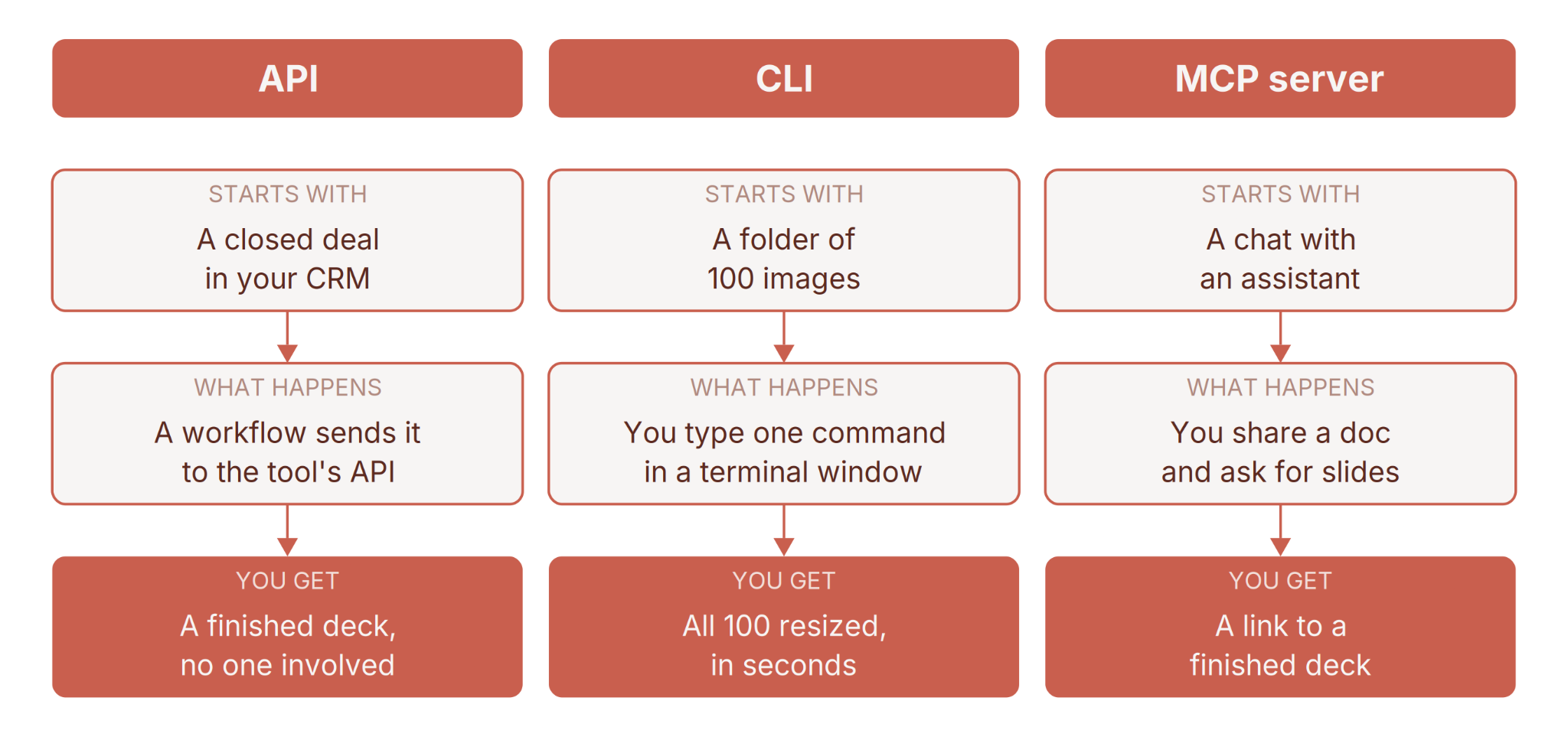
API Scenario: Imagine you have a sales CRM that generates a new document every time a deal is closed, summarizing the key details of the sale. You could set up an automated workflow that uses the Plus AI API to convert each of these documents into a slide deck, ready for the next sales meeting. This would happen completely automatically in the background, without any manual intervention.
CLI Scenario: Let’s say you’re comfortable working in a terminal. You have a folder of a hundred images that all need resizing before they go into a deck. Instead of opening each one, you type a single command and the whole folder is processed in seconds. Designers do this with image tools, developers do it with version control tools like GitHub and data analysts do it with file conversion tools. The pattern is always the same: one line of text, one specific job, done immediately.
MCP Scenario: Finally, imagine you’re chatting with an AI assistant like Claude about an upcoming strategy meeting. You have a rough outline in a document, so you share it and ask for slides. The assistant hands it to Plus AI behind the scenes and gives you back a link to a finished deck—just a request in plain language, no setup.
How APIs, CLIs, and MCPs fit together
APIs, CLIs, and MCP servers are not three competing products fighting for the same job. They’re three doors into the same building. Underneath, there’s usually one API doing the real work, and the CLI and the MCP server are relatively thin layers sitting on top of it, each shaped for a different kind of visitor.
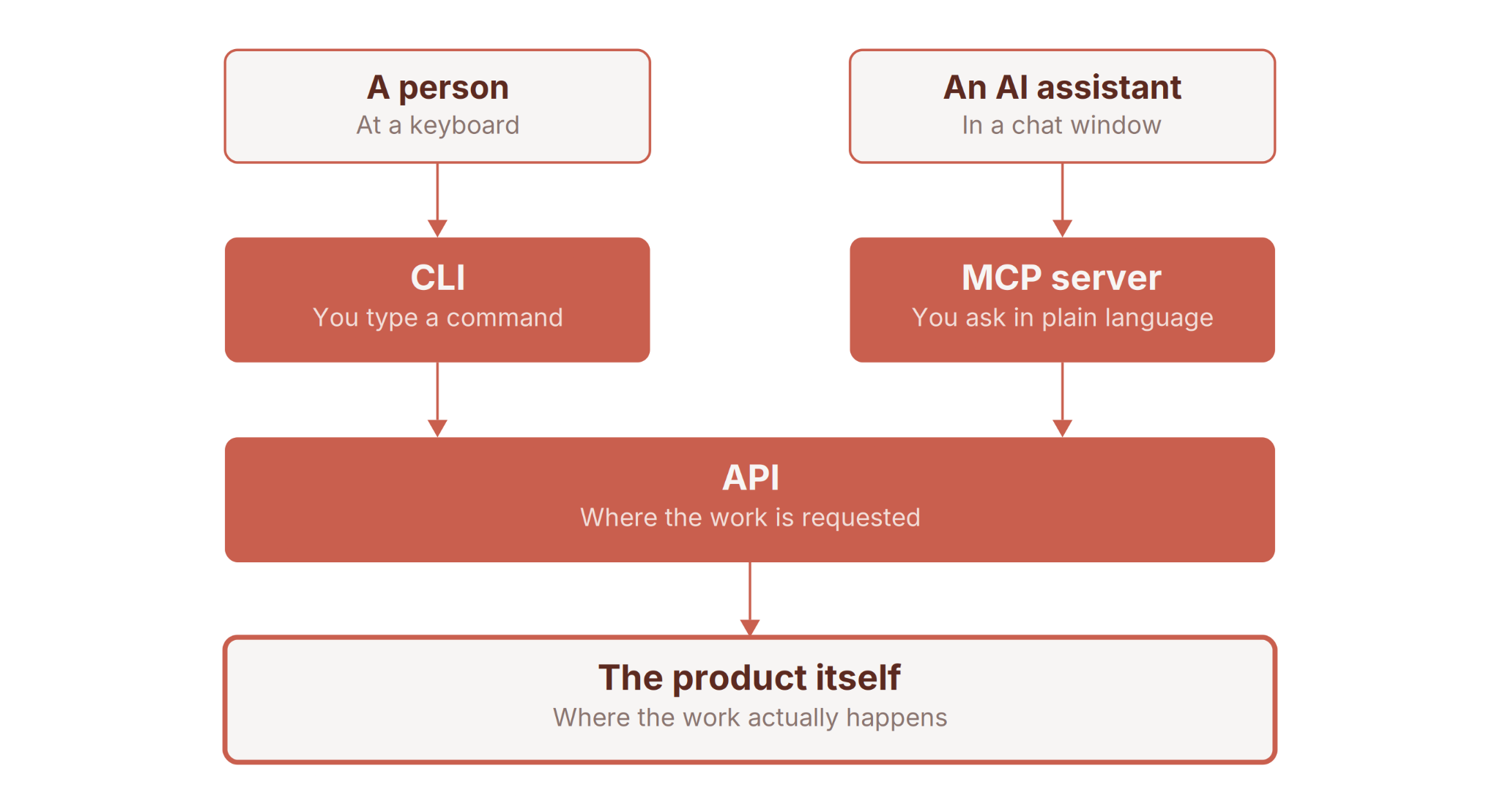
Note: an AI assistant can also reach the CLI
When you type a command into a CLI, that command is almost always turned into an API request behind the scenes. When an AI assistant uses an MCP server, that server is usually turning your conversational request into the same API request. Plus AI works exactly this way—its MCP server sits on top of the same Presentations API a developer would call directly.
None of the three is “better.” You need to ask who or what is doing the asking—a person at a keyboard, a program running on a schedule, or an AI assistant in a chat window—and pick the door built for that visitor.
When an AI assistant uses a tool: CLI or MCP?
An AI assistant has two ways to use an outside tool. It can go through an MCP server, or it can run the tool’s command-line commands itself—writing the command, running it, and reading the result, the same way a person would, just faster.
Which one is better depends on how often the assistant needs the tool. An MCP server loads its full list of available actions into the assistant’s memory up front, whether they get used or not. That’s convenient for something the assistant reaches for constantly, but that’s weight it carries the whole time. A CLI costs nothing until the moment a command is typed, which makes it the leaner choice for a tool used occasionally, or when the assistant is juggling many tools at once and can’t afford to hold every menu in memory.
The rough rule:
-
MCP when the connection is tight and frequent and you want the tool always at hand
-
CLI when the assistant needs something now and then and you’d rather keep it light. It’s why coding assistants, which touch dozens of tools, lean heavily on the command line
How do you decide which interface to choose?
Deciding which interface to choose depends on many factors. But here’s a simple flowchart you can use to make the right decision:
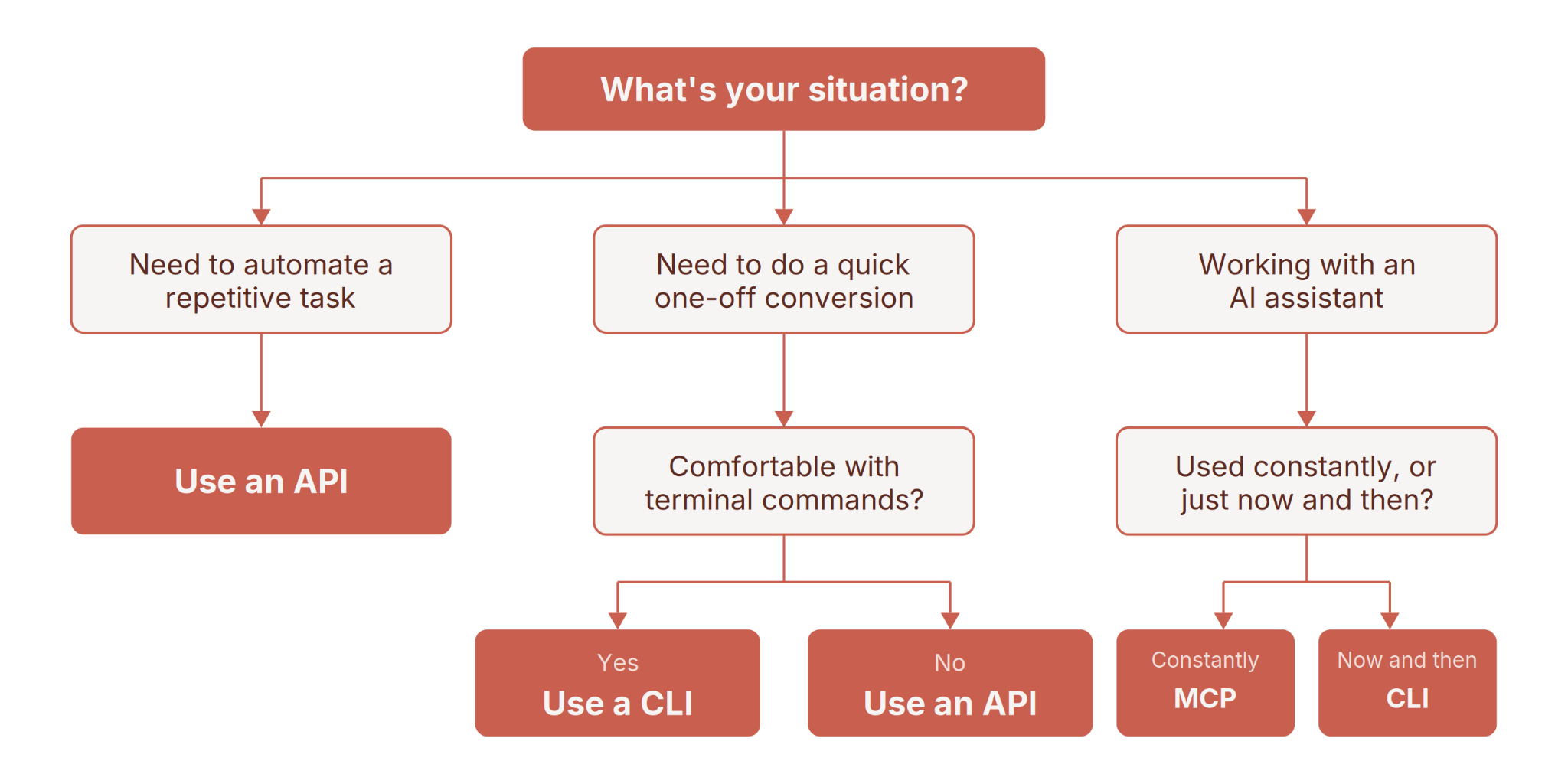
For more on what’s behind each path, ask yourself these questions:
- Do you need the same result every time? An API and a CLI are predictable. Give them the same input on Monday and again on Friday and you get the same output both times. That’s the whole point of them.
An MCP server hands your request to an AI assistant, which makes its own judgment calls about how to fulfill it. Ask for a deck about last quarter’s results twice and you’ll get two decks that cover roughly the same ground but differ in slide order, headline wording, and emphasis.
For exploring an idea, that variation is fine and sometimes helpful. For generating fifty client decks that all need to look like they came from the same template, it’s a real problem.
-
How much setup are you willing to do? An MCP server is the quickest to get going—you connect it once in your AI assistant and then just ask for things in plain language. A CLI needs you to be comfortable with a terminal and to learn the specific commands, but there’s nothing to build. An API requires the most up-front work. Someone has to write the code that calls it, or connect it through an automation tool like Zapier or Make. But once that’s done, it runs indefinitely without anyone touching it. The more setup a door requires, the less attention it needs afterward.
-
How often does this need to happen? If you need one deck right now, all three are fine and the difference is a matter of seconds. A CLI handles bulk fine, but you have to be there to run it. If you need two hundred decks, only the API is realistic. An AI assistant working through an MCP server handles requests one conversational turn at a time, and it thinks between each one. An API can be handed the whole batch at once.
-
What will it cost? A CLI adds nothing to your bill. It’s a wrapper around the same service, so you pay whatever that service charges—the same as if a program had made the request. What it costs is your attention: someone has to be there to type the command and wait for it to finish. An API charges you per request, and that’s the whole bill. An MCP server costs you the same underlying work plus the AI assistant’s time reading your request, deciding what to do, and interpreting the result. For one deck that’s a rounding error. Across hundreds, it adds up meaningfully.
-
How sensitive is your document? Many command-line tools do their work entirely on your own computer—resizing images, converting files, nothing uploaded. Others connect to an online service, and then your file goes to that one service and stops there. An API works the same way. An MCP server adds a step—your document passes through the AI assistant first, which means a second company handling it under its own privacy policy. For a marketing deck, fine. For unreleased financials or anything under a confidentiality agreement, check your organization’s policy before connecting anything.
-
What happens when the interface goes wrong? An API fails cleanly—a specific error, and it either retries or stops. A CLI does the same, and you see it immediately. An MCP server has an AI assistant in the middle deciding what to do about the problem. Sometimes it works around a glitch and you never notice. Sometimes it improvises and hands you a confident result that looks exactly like one that worked.
Remember: this isn’t a permanent decision. Plenty of workflows start in an AI assistant, prove they’re worth doing every week, and move to an API later. Starting with the easiest door and switching when the work outgrows it is a perfectly reasonable way to go.
5 mistakes to avoid when using APIs, CLIs, and MCPs
When working with these interfaces, watch out for these common pitfalls:
1. Using an MCP server for tasks that should be fully automated with an API
MCP servers are designed for natural, conversational interactions with AI assistants. They’re great for ad-hoc requests and exploratory tasks where the exact steps may not be known in advance. However, they’re not the best choice for high-volume, repetitive jobs that need to run on a set schedule.
For those kinds of tasks, you’ll want to use a direct API integration. APIs are optimized for speed and efficiency. They have predictable inputs and outputs, and they can handle large volumes of requests without the overhead of natural language processing. Trying to force an MCP server to do the job of an API will likely lead to slower performance, higher costs, and potential reliability issues.
2. Trying to do complex, multi-step tasks with a CLI
Command-line tools are built around a simple idea: one command does one job. That’s why they feel fast—you type a line, the thing happens, you move on.
The trouble starts when your task has several steps with decisions in between. Take a folder of images, resize the ones over a certain size, rename them by date, then drop them somewhere. Every one of those is a separate command, and the decisions between them are yours to make each time. Do that once and it’s fine. Do it every week and you’re either learning considerably more than you signed up for, or doing it by hand and calling it automation.
At that point you’ve outgrown the door you picked. Anything that repeats on a schedule, or that branches depending on what it finds, belongs on the API side.
3. Assuming an MCP server can do everything an API can
An MCP server usually exposes a slice of what a tool can do, not all of it. The most common actions get made available in plain language, the more specialized settings often don’t.
In practice this means you can ask an AI assistant for a deck and get one, but the specific control you want—a particular template, a fixed number of slides, output in another language—may or may not be available through that route. It varies by tool, and the only way to know is to check the tool’s documentation or simply try it.
It’s worth knowing this works in both directions. If something isn’t available through the AI assistant, that doesn’t mean the tool can’t do it. The full capability list lives in the tool’s own documentation, and the assistant is only showing you part of it.
4. Assuming your plan includes API or MCP access
This one is easy to trip over because it isn’t obvious until you go looking. Programmatic access is usually gated to higher tiers. If your reason for subscribing is automation, check which tier actually unlocks it before you commit, not after you’ve built something on top of it.
5. Letting an AI assistant handle documents it shouldn’t see
Connecting an MCP server to your AI assistant is genuinely easy, which makes it easy to skip a step worth taking. Once connected, anything you hand the assistant passes through it on the way to the tool.
For most everyday work that’s completely fine. For anything under a confidentiality agreement, anything unreleased, or anything with customer data in it, take a minute to check your organization’s policy on which AI tools are approved for that material. If the answer is unclear, an API-based workflow keeps the document’s path shorter.
Choosing the right one for your workflow
APIs, CLIs, and MCP servers are all powerful tools in the age of automation and AI assistance. By understanding what each one is best suited for, you can choose the right interface for your needs and make the most of tools like Plus AI.
Remember: APIs for deep integrations and automated tasks, CLIs for quick terminal commands, and MCP servers for natural conversational interactions with AI. And don’t be afraid to mix and match—the most powerful workflows often use multiple interfaces in harmony.
With this knowledge, you’re ready to streamline your work, automate the tedious parts, and free up your time and mental energy for the tasks that truly require human creativity and judgment.
FAQs
Q: Do I need to be a programmer to use APIs, CLIs, or MCP?
A: Not necessarily, but some basic technical comfort helps, especially for APIs and CLIs. MCP is designed to be usable by anyone comfortable with AI assistants.
Q: Can I use all three interfaces for the same task?
A: Often yes, it just depends on your specific situation and preferences. Many tools offer multiple interfaces for flexibility.
Q: Are APIs, CLIs, or MCP servers better for data security?
A: The practical difference is how many companies handle your file. With an API, it goes to the tool you’re using and stops there. With an MCP server, it passes through the AI assistant first, so a second company handles it under its own privacy policy. Many CLI tasks never send the file anywhere at all, since the work happens on your own computer.
Q: Which interface is easiest to learn?
A: For most non-technical users, MCP servers will likely be the most natural, as they work through conversational AI. CLIs have a learning curve for the specific commands, and APIs require the most technical knowledge.
Q: Can I use an MCP server with any AI assistant?
A: Any AI assistant that supports the MCP standard should be able to use an MCP server. However, the exact capabilities and integrations may vary.
Q: Can an AI assistant use a CLI instead of an MCP server?
A: Yes—it writes and runs the command itself, then reads the result. It’s often the lighter option, since an MCP server keeps its full list of actions in the assistant’s memory the whole time while a CLI only costs anything when it’s actually used. For a tool the assistant reaches for constantly, MCP is smoother; for occasional use, the command line is leaner.