
Resources
AI Agents vs. Chatbots: What’s the Difference?
Many “AI agents” are really chatbots in disguise. This guide breaks down the differences, use cases, costs, and ROI of each.

Almost every AI vendor now claims to sell an “AI agent.” The term has become so diluted that it covers everything from a basic FAQ chatbot to an autonomous system that executes multi-step workflows without human intervention.
But an “AI chatbot” and an “AI agent” are two (very) different things. For consultants and researchers evaluating these tools—or advising clients on which to adopt—the confusion has real consequences.
Gartner predicts more than 40% of agentic AI projects will be canceled by the end of 2027, largely because organizations are investing in tools that don’t match their actual needs. Many companies are buying “agents” that are really chatbots. Others are deploying chatbots where they genuinely need an agent. Both mistakes cost time and money.
This article breaks down the real differences between AI agents and chatbots. We’ll cover what each actually does, where the ROI gap shows up, and how to decide which one fits a given use case. If you’re making build-or-buy decisions for your firm or advising clients on theirs, this is the framework to start with.
Many companies say they’re using AI agents, but they’re actually using chatbots
“AI agent” has become one of the most overused labels in enterprise tech. Gartner calls it “agent washing,” aka, vendors rebranding existing chatbots and basic automation tools as agents without adding any real autonomous capability. Of the thousands of vendors claiming to offer agentic AI, Gartner estimates only about 130 are legitimate.
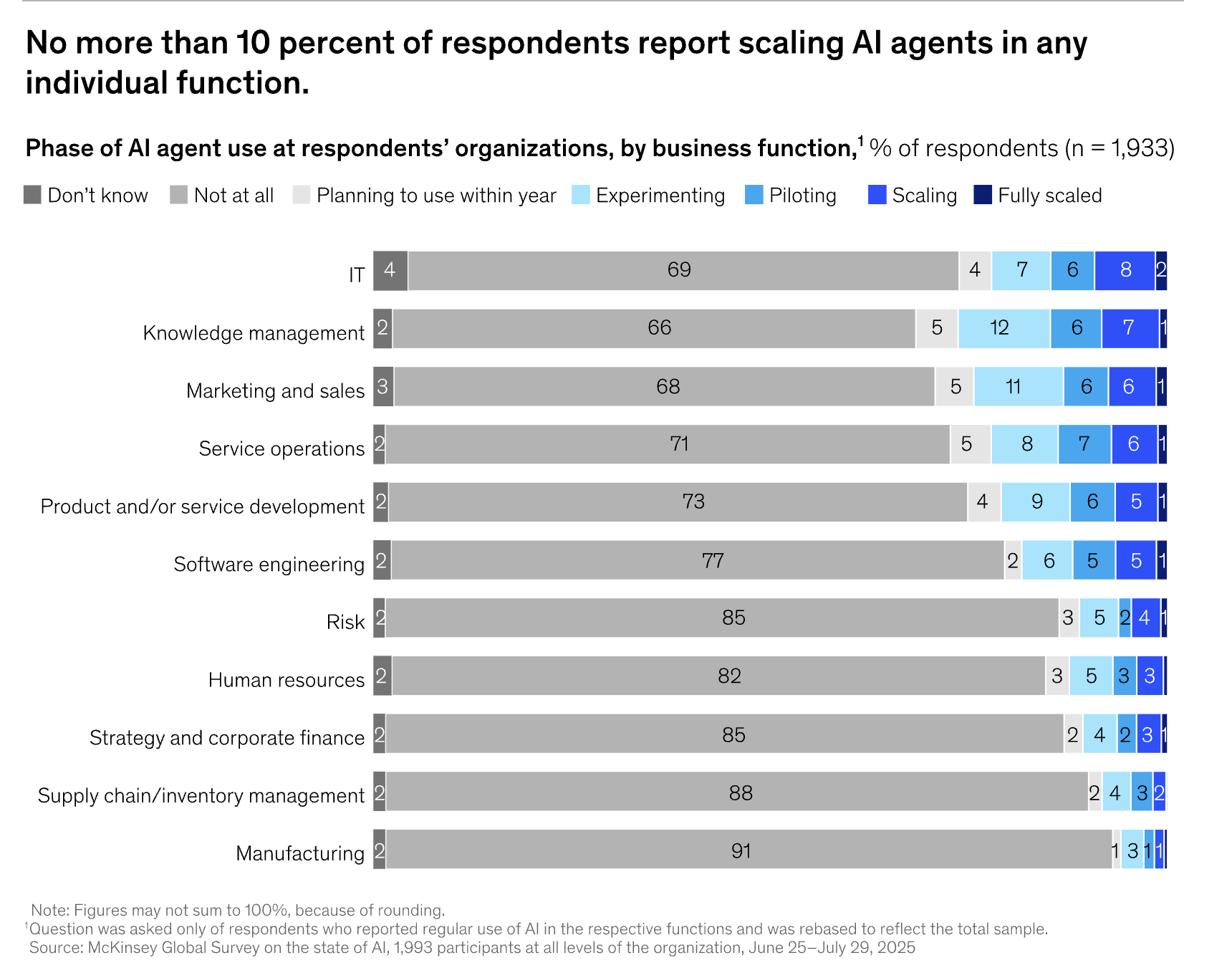
The buyer side looks similar. A McKinsey survey found that while 23% of organizations say they’re scaling agentic AI, most are doing so in just one or two functions. In any given business function, no more than 10% are actually scaling agents. The rest are running chatbots and calling it a day.
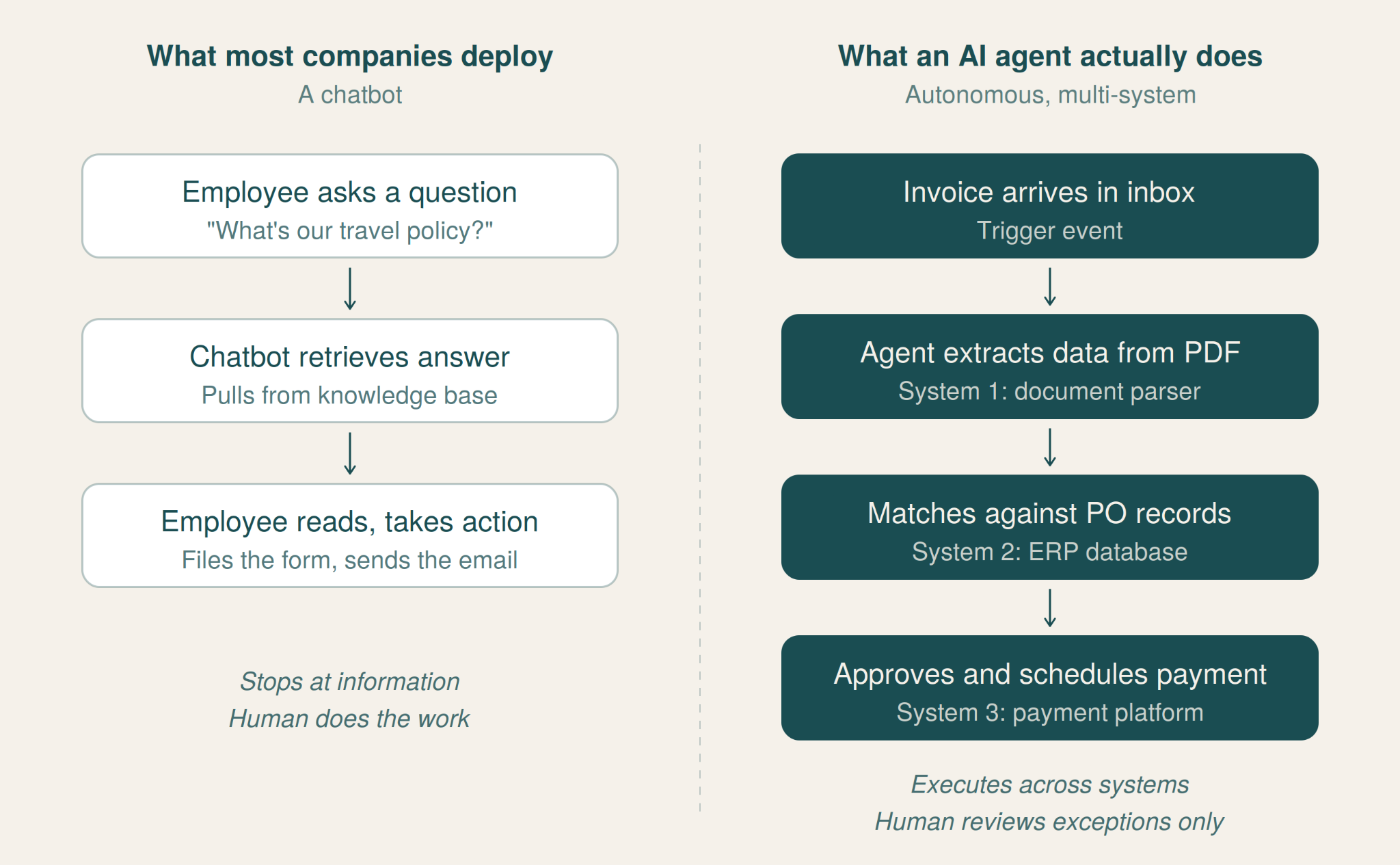
This matters if you’re advising clients or evaluating tools for your own firm. A chatbot that answers HR questions from a knowledge base versus an agent that autonomously processes invoices across three systems are fundamentally different technologies—with different costs, different risks, and very different ROI profiles.
What chatbots actually do (and where they fall short)
A chatbot takes a question, matches it to a knowledge source, and returns an answer. That’s the core loop. Whether it’s a basic rule-based bot or one powered by a large language model, the interaction follows the same pattern: the user prompts, the chatbot responds, and then it waits for the next prompt.
Modern chatbots have gotten significantly better at this. LLM-powered chatbots can understand natural language, handle follow-up questions, and pull from large knowledge bases without needing rigid decision trees.
Consulting firms have built their own—McKinsey’s Lilli, BCG’s GENE, Bain’s Sage, PwC’s ChatPwC—and employees use them to draft emails, summarize research, answer internal policy questions, and speed up routine analysis.
But the ceiling is always the same. A chatbot can tell you:
-
what the travel reimbursement policy says
-
summarize a 40-page report
-
draft a first pass at a client email
What it cannot do is take action on any of those things. It won’t:
-
file the reimbursement
-
route the report to the right stakeholder
-
send the email on your behalf
Every step beyond retrieving and generating information requires a human to pick up where the chatbot left off.
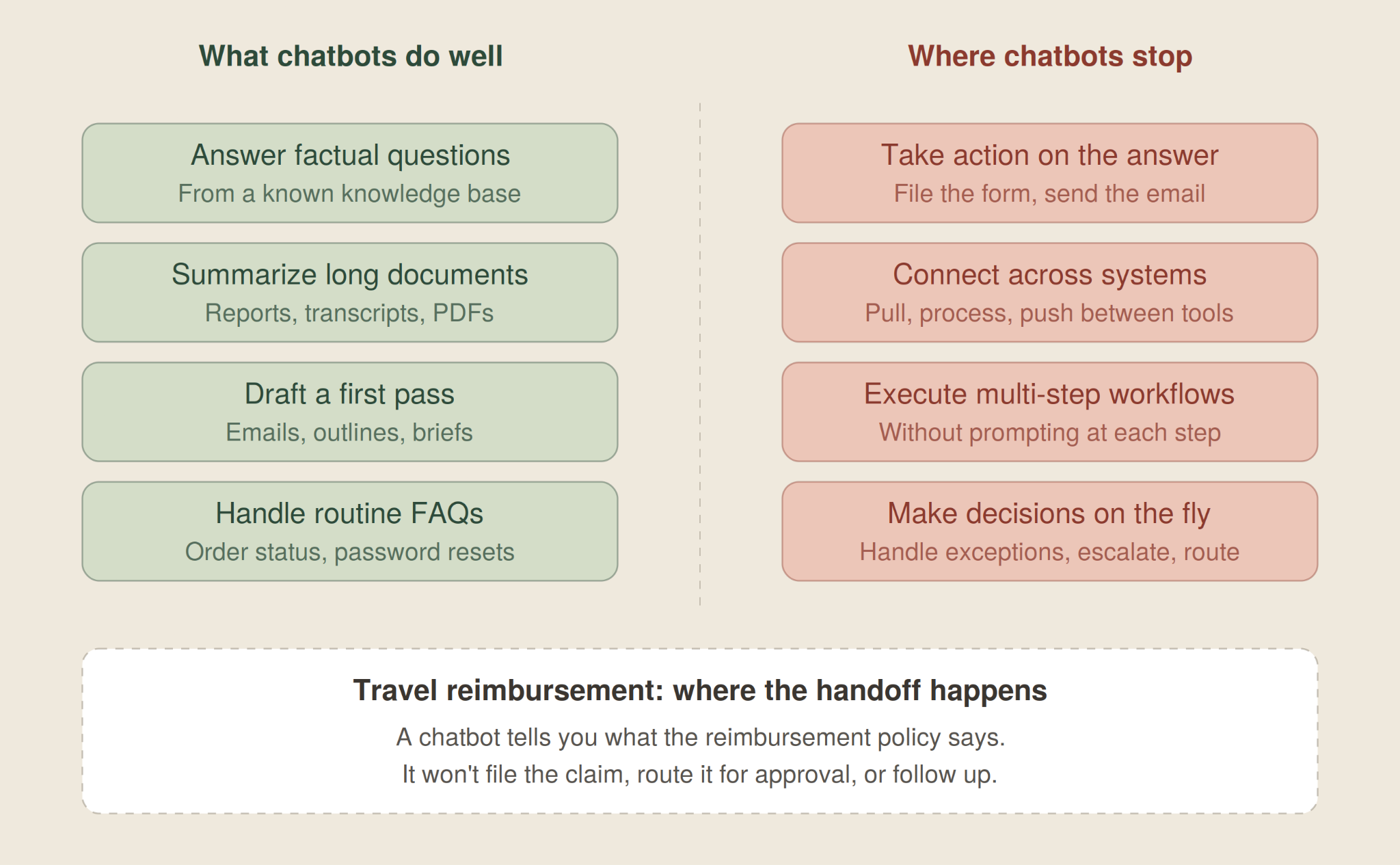
That boundary—retrieval and generation, but not execution—is what separates a chatbot from an agent, no matter what a vendor calls it.
What makes an AI agent an agent: Autonomy, multi-step workflows, and decision-making
An AI agent doesn’t wait for you to tell it what to do at every step. You give it a goal, and it figures out how to get there—planning the steps, executing them across tools and systems, and making decisions within guardrails along the way.
Take a concrete example: you tell an agent to prepare a competitive analysis for a client pitch. A chatbot would give you a summary of what it knows about the competitor. But an agent would pull recent earnings data, cross-reference it with industry reports, draft the analysis in your firm’s slide format, and flag areas where it needs your input before finalizing.
Three things distinguish a genuine agent from a chatbot wearing an agent label:
-
Autonomy: an agent can initiate and complete tasks without being prompted at every step. It doesn’t just answer, it acts. JPMorgan’s agent suite, for example, generates investment banking presentations in roughly 30 seconds, work that previously took analysts hours of manual assembly.
-
Multi-step workflows: an agent connects to multiple systems and executes a sequence of actions. Deloitte’s Zora AI agents handle tasks that span code generation, data analysis, and document creation—not as three separate prompts, but as one workflow triggered by a single instruction.
-
Decision-making within guardrails: an agent makes judgment calls—which data source to prioritize, when to escalate to a human, how to handle an edge case—based on rules and context you define. This is what separates it from basic automation, which follows a fixed script regardless of what it encounters.
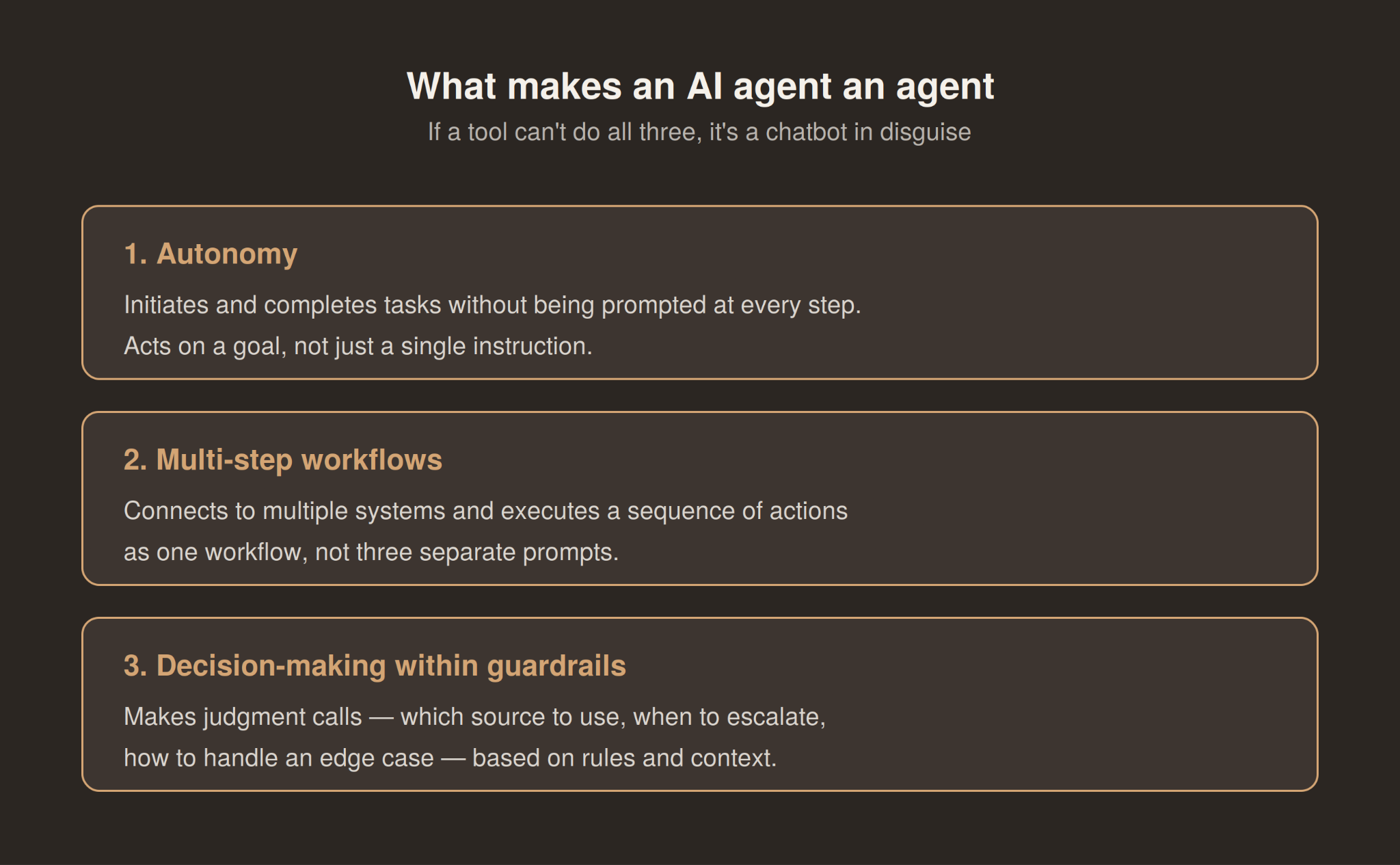
If the tool you’re evaluating can’t do all three, it’s a chatbot or an automation tool, not an AI agent.
Chatbots answer questions, agents eliminate work
The ROI difference between chatbots and agents comes down to what each one actually removes from a workflow. A chatbot removes the time spent looking something up. An agent removes the work itself.
A chatbot can tell a customer their order status, surface a return policy, or draft a response for a service rep. Useful—but the human still has to process the return, update the system, follow up, and close the loop. The chatbot handles one step. Everything downstream still needs a person.
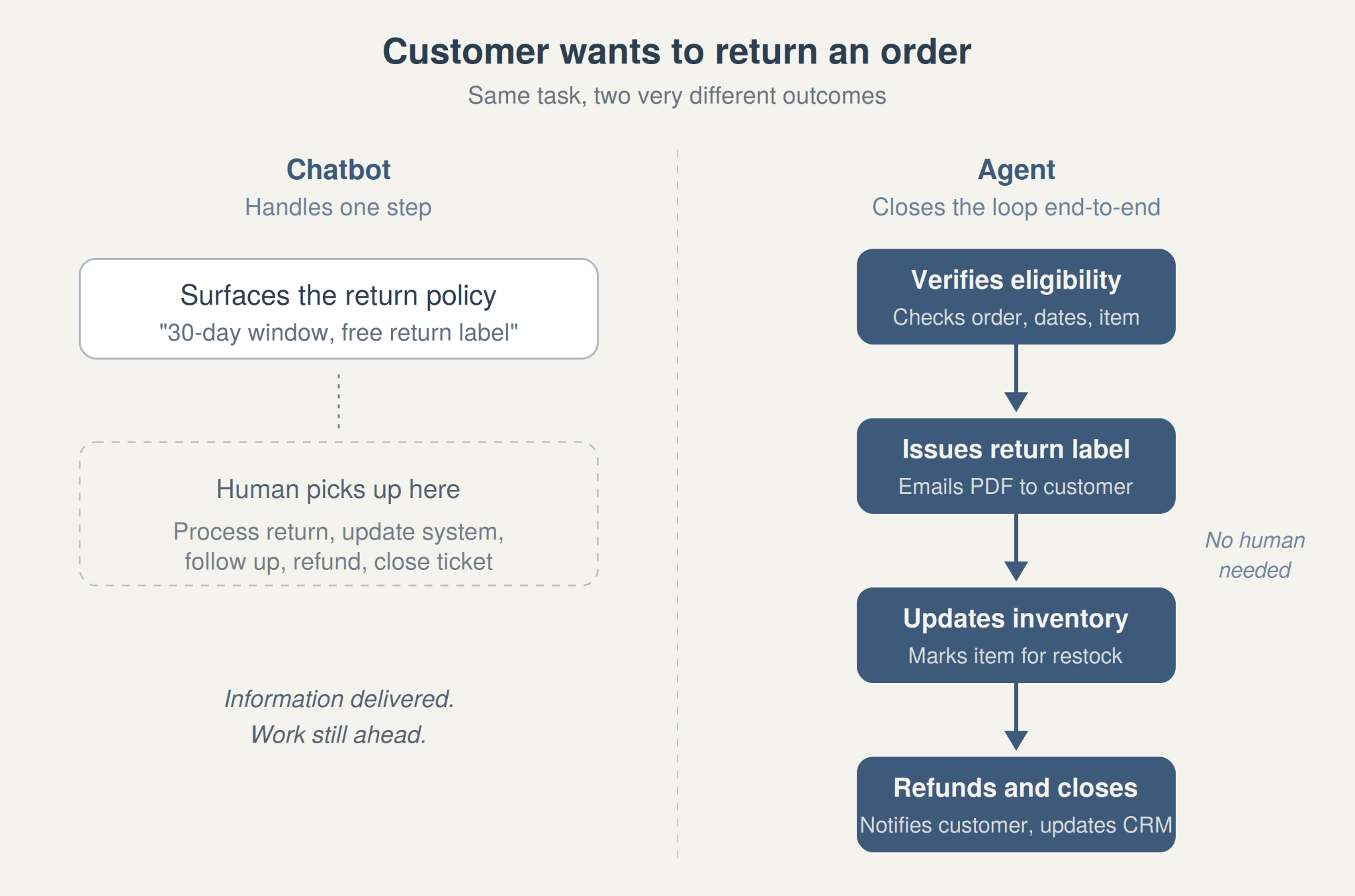
Agents compress the entire process. Wiley, for example, saw a 40% improvement in case resolution after replacing its previous chatbot with Salesforce’s Agentforce and measured a 213% ROI.
The agent could actually execute tasks—resetting passwords, triaging payment issues, routing cases—instead of just answering questions about them.
The shift is happening inside consulting firms, too. McKinsey CEO Bob Sternfels told Harvard Business Review that the firm now counts 25,000 AI agents alongside its 40,000 human employees, up from 3,000 agents just 18 months earlier.
These agents handle research, data analysis, and document preparation that junior consultants used to do manually.
The pattern is consistent across industries: chatbots save time on information retrieval, agents save time on execution. And execution is where the real cost sits.
When a chatbot is the right call (and when it’s not)
Chatbots get a bad reputation in these conversations, but they’re still the right tool for a lot of use cases—especially when the task is straightforward, the volume is high, and the cost of getting it wrong is low.
Internal knowledge retrieval is the clearest example. As we discussed previously, every major consulting firm has built one (McKinsey’s Lilli, BCG’s GENE, etc). Employees use them to look up policies, summarize documents, draft first passes at emails, and pull from internal research libraries.
These tools work because the task has a clear boundary—the user asks a question, the chatbot returns an answer, and the user decides what to do with it.
Customer-facing FAQ handling is another strong fit. Order tracking, return policies, account resets—these interactions are simple, the stakes are low, and speed matters more than nuance. A chatbot can handle thousands of these simultaneously, around the clock, without a queue.
Where chatbots fall apart is anywhere the task requires action, judgment, or coordination across systems.
For example, if a customer needs a refund processed, not just explained. Or if an analyst needs data pulled from three sources and synthesized into a deliverable, not just summarized. If a workflow involves conditional logic (do X if this, do Y if that), a chatbot will hit its ceiling fast. It’ll give you the answer, then wait for you to do the work.
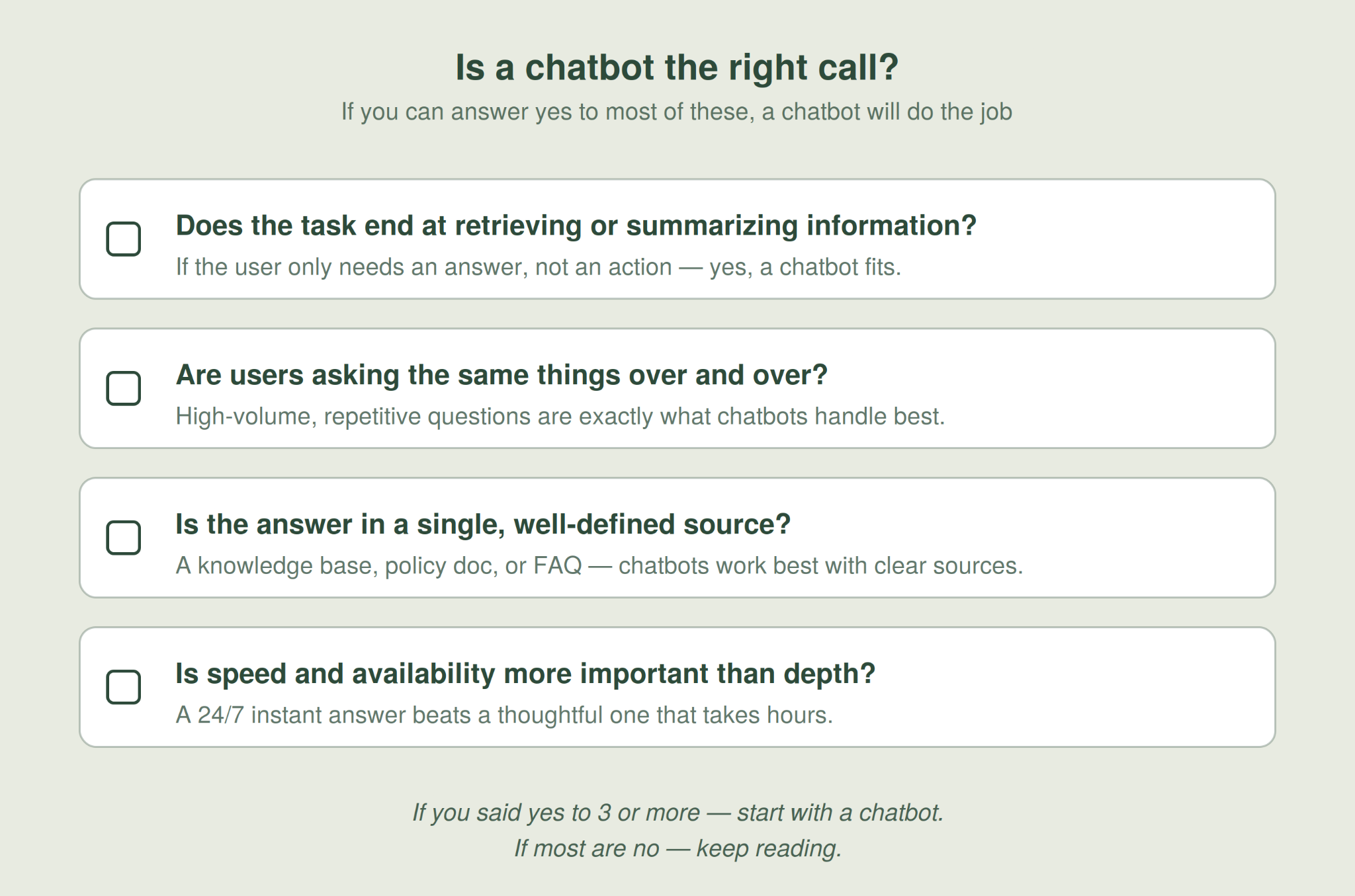
The rule of thumb: if the task ends at retrieving information, a chatbot is fine. If the task starts at information and requires execution after that, you likely need an agent.
When you need an agent (and what to look for before buying one)
The case for an agent starts where a chatbot’s ceiling shows up—when the task requires execution across systems, involves conditional logic, or needs to run without someone manually running every step.
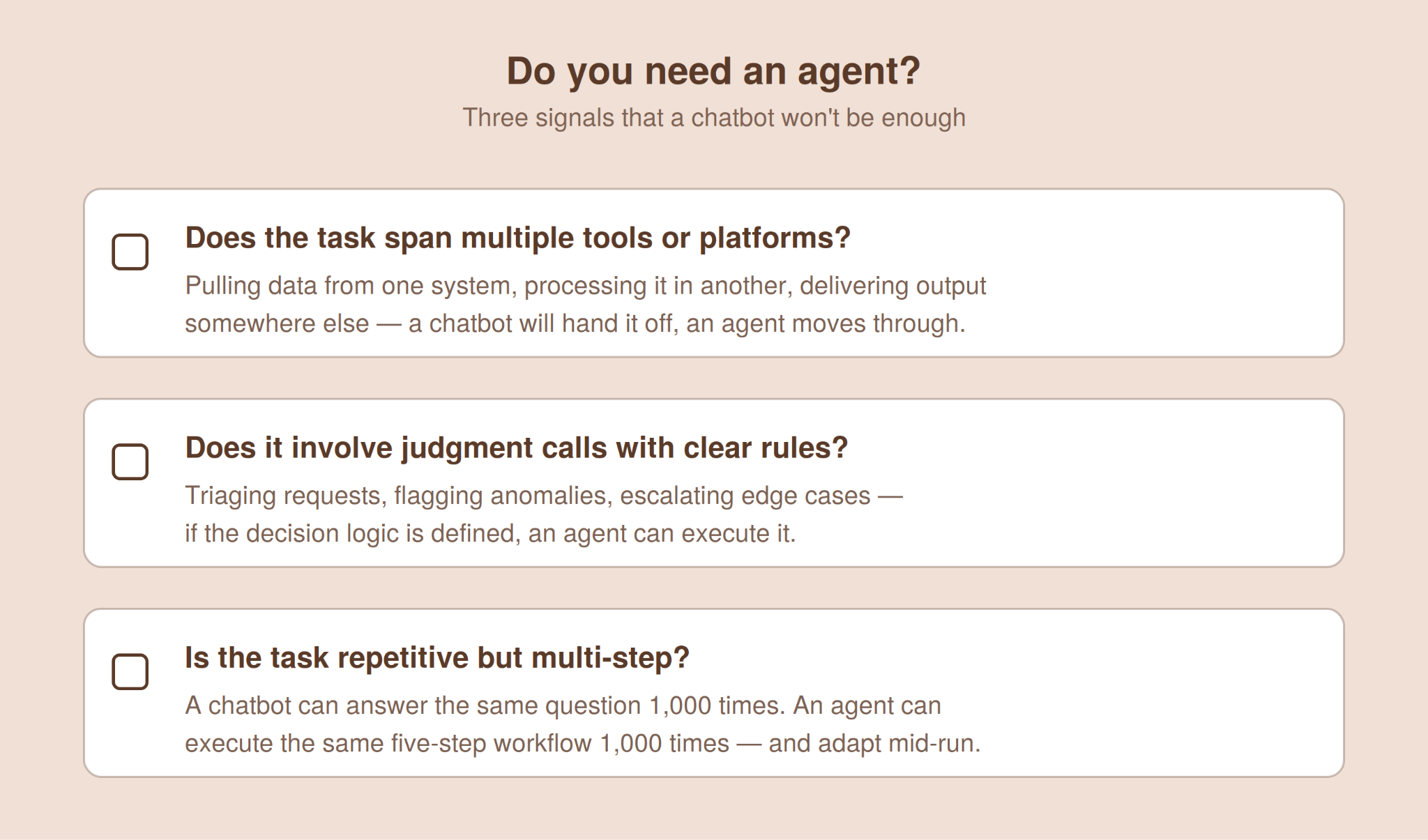
A few signals that a workflow is a candidate for an agent rather than a chatbot:
-
The task spans multiple tools or platforms. If completing the work means pulling data from one system, processing it in another, and delivering the output somewhere else, a chatbot will hand you the information and leave the rest to you. An agent connects to those systems and moves through the steps.
-
The task involves judgment calls with clear rules. An agent can filter incoming requests, flag anomalies, escalate edge cases, and route work to the right person—as long as the decision logic is defined. If the rules are too ambiguous or the stakes too high for any automation, you still need a human.
-
The task is repetitive but multi-step. This is where agents pull ahead of both chatbots and basic automation. A chatbot can answer the same question a thousand times. An agent can execute the same five-step workflow a thousand times (and adjust when something in step three doesn’t look right).
Before buying, three things worth verifying:
-
What systems does it actually connect to? An agent that can’t integrate with your existing tools is not useful. Ask for a list of native integrations and requirements to build custom connections.
-
What does the human-in-the-loop model look like? Every serious agent deployment needs guardrails—points where the system pauses for human review before continuing. If the vendor can’t explain where those checkpoints are, the product is either immature or overselling its autonomy.
-
What happens when it fails? Chatbots fail gracefully. They give a bad answer, and you ignore it. Agents fail expensively—they take a wrong action across a live system. Ask how the tool handles errors, rollbacks, and audit trails.
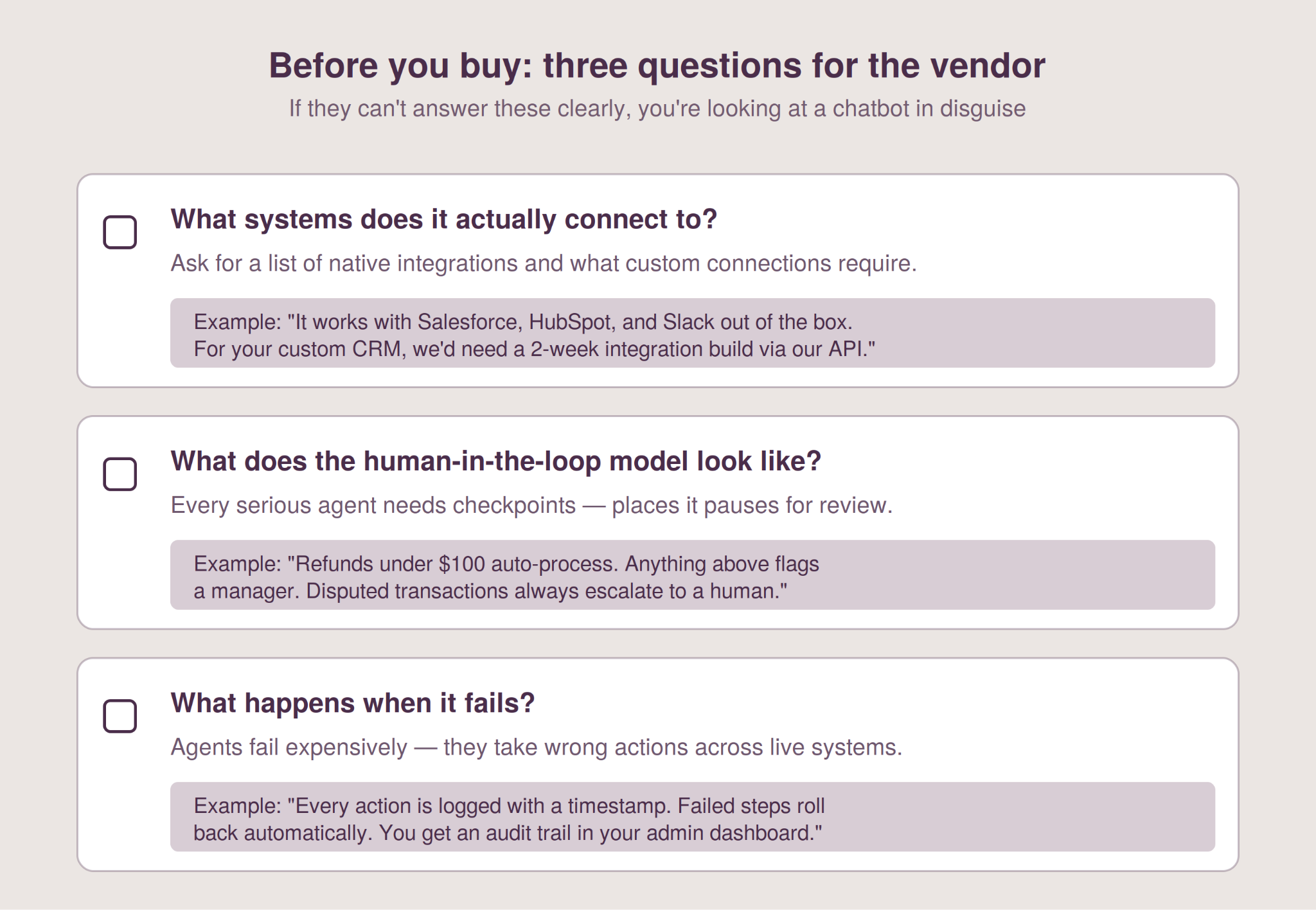
None of these questions is a deal-breaker on its own. But if a vendor can’t answer all three clearly, you’re probably looking at a chatbot dressed up with an agent label—and you’ll figure that out the hard way once it’s in production.
The hybrid approach: Why most teams will end up using both
The agent-vs-chatbot framing is useful for understanding what each tool does. But in practice, most teams won’t pick one and discard the other—they’ll use both, for different parts of the same workflow.
A consulting firm might use a chatbot for internal knowledge retrieval—letting employees search policies, pull from research libraries, and draft first passes at deliverables. That same firm might use an agent to handle the downstream work: formatting the deliverable in the client’s template, pulling in the latest data from a connected source, and routing it for review. The chatbot handles the question. The agent handles the process that follows.
For teams just starting out, the practical path is usually: deploy a chatbot first, learn where employees hit its ceiling, then introduce agents for the workflows where that ceiling costs the most time or money.
Trying to go straight to agents without understanding where the bottlenecks actually are is how you end up overbuying.
Do you need a chatbot or an agent?
You need a chatbot if:
-
The task ends at retrieving or summarizing information
-
Users are asking repetitive questions with known answers
-
The interaction is one turn: question in, answer out
-
Speed and availability matter more than workflow execution
You need an agent if:
-
The task requires action across one or more systems
-
The workflow has multiple steps with conditional logic
-
You want the tool to execute work, not just inform it
-
The cost of doing the work manually is high enough to justify the investment
You probably need both if:
-
Your team already uses AI for research and drafting, but the manual work between AI output and final deliverable still takes hours
-
Different parts of the same workflow have different complexity levels—some steps need retrieval, others need execution
Start by mapping where your team’s time actually goes—the answer will tell you which tool belongs where.