
Resources
Can AI Make Good Presentations Yet? An Honest Analysis
AI presentation tools have improved fast. An honest, objection-by-objection look at what they can and can't do well yet.

If your last experience with AI presentation tools was a year or more ago, you probably clicked away feeling underwhelmed. Earlier versions of these tools used less advanced AI models, which often produced repetitive layouts, generic copy, and off-brand images.
But given how quickly these tools develop and how often new AI models roll out, it’s worth taking another look at AI-powered slide deck tools to see how well they do at generating professional presentations.
So, can AI create good presentations yet? To answer this question, I’ve compiled some common complaints about this category and answered them based on my experience testing over a dozen presentation tools. Let’s go through them one by one.
Can AI make good presentations? The short answer
Yes, the right AI tools can now generate high-quality presentations with clear takeaways, scannable slides, consistent branding, and relevant content for the audience. Many tools in this category have come to excel at producing strong decks with on-brand layouts, copy, and visuals.
So, what’s different about them now versus a year or more ago? From Anthropic to OpenAI to Google, the best slide deck tools use the latest large language models (LLMs) to generate copy, images, and slide designs. Most use multiple AI models throughout the workflow. This way, every element of your deck looks and sounds professional.
And many AI presentation tools go beyond content generation alone. Some have built-in editing tools (often including in the form of AI assistants) so you can easily refine decks in one click or with a simple prompt. That means you can spend way less time on manual edits.
Some tools integrate directly with Google Slides, Microsoft PowerPoint, or both. These integrations allow teams to keep working in the tools they already use, which is great for reducing friction and keeping tech stacks lean.
But even the most advanced tools still need human input and oversight. Give them basic prompts, and you’ll probably end up with generic content that needs a ton of edits. To create compelling presentations, you have to know what your audience needs to hear.
Do AI presentations all look the same?
Early tools often pulled from a small pool of generic templates. This meant many AI presentations looked similar, with repetitive layouts across audiences and use cases.
Now, slide deck generators typically have larger libraries of prebuilt templates or slides. There’s much more variety from deck to deck, and you can easily generate one that’s tailored to your brand, use case, or audience.
For example, Plus AI has over two dozen professionally designed templates. You’ll find options for board presentations, sales decks, investor pitches, academic talks, and much more.
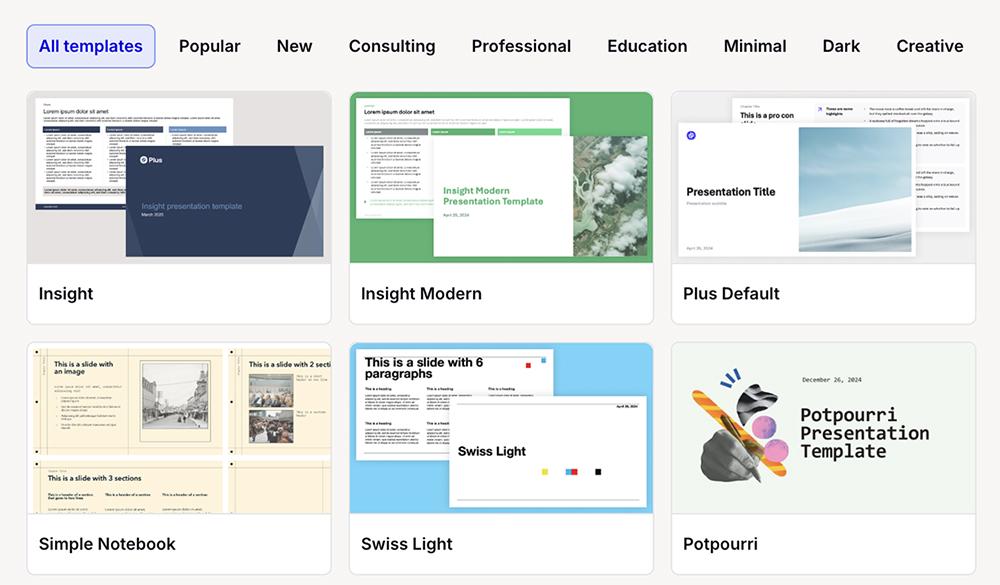
But you don’t have to rely on these predesigned templates alone. With tools like Plus, you can set up your own custom branding.
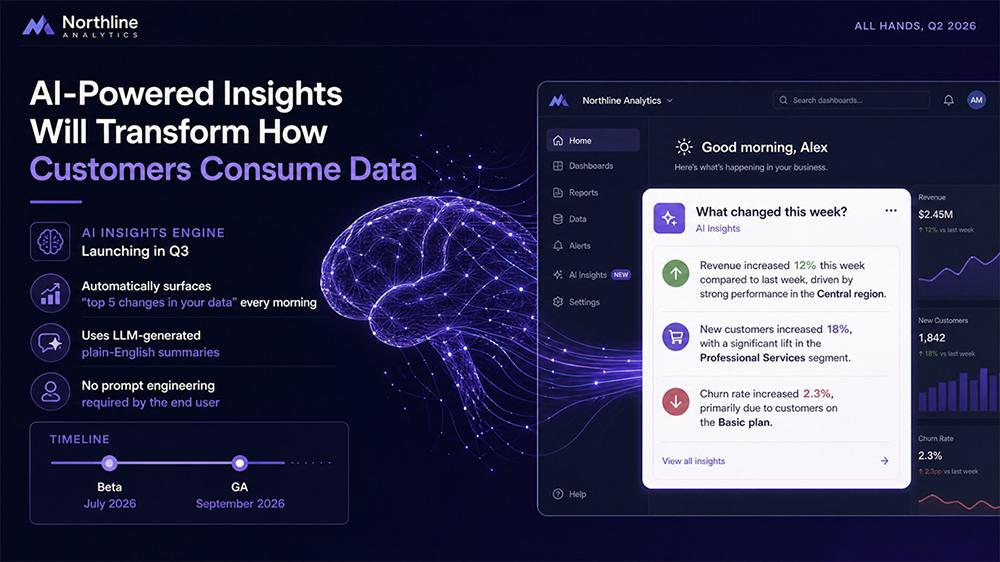
And when you want truly unique presentations, look for a tool that acts more as a content generator than an automated slide deck designer. Plus AI does both. The Plus presentation designer pulls from the template library, and image mode uses GPT-Image 2 to generate original, highly visual presentations.
Is AI-generated slide content just generic filler?
Previous versions of slide deck tools used AI models with less advanced content generation capabilities. This often led to generic slide copy and presentations that sounded, well, like AI.
Most tools today use much more developed AI models, which allows for higher quality slide copy. But you can’t depend solely on the LLM. Even if you give current tools a one-line prompt or general instructions, you’ll likely end up with slide copy that doesn’t say anything particularly unique.
That’s why the best AI presentation tools accept detailed prompts. They have generous character limits so you can input specific instructions for each slide and provide background information about your company, audience, and goals.
Many tools also allow file uploads and integrations with Google Workspace and Microsoft 365. This means you can provide additional context by uploading reports, personas, or one-pagers.
For example, Plus AI supports PDF, PPTX, and Word document uploads as well as integrations with Google Drive and OneDrive. It can turn existing files into presentations or enhance them via the instructions in your prompt, giving you plenty of options to create custom decks.
Won’t AI slide images look like stock photos?
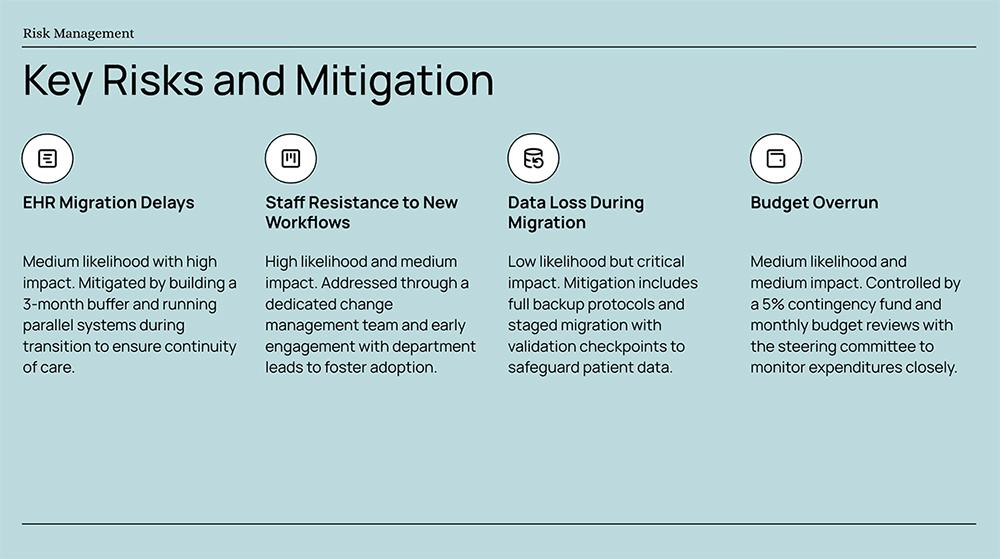
Historically, slide deck images have disappointed for a couple reasons. Some tools default to pulling images from stock photo libraries, which means the images aren’t unique. Others only have access to older or less powerful AI image generators, often leading to low-quality or off-brand images.
If you’ve been disappointed by AI images in the past, you’ll be happy to learn that today’s presentation tools are much more capable at generating high-quality visuals. Most let you choose your image source, with options that include a mix of stock photo libraries and AI image models.
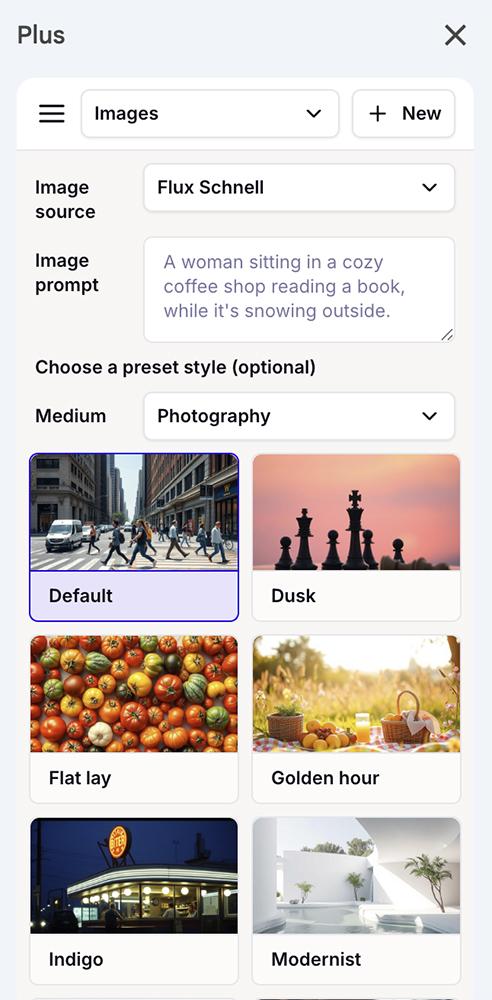
Many AI presentation generators also let you pick your preferred image style. That means you can prompt the tool to generate professional photos, cinematic visuals, or original illustrations throughout the deck.
In addition, most presentation tools have a library of graphics and icons. This way, they can easily insert on-brand visuals to fit any theme.
For example, Plus generates AI images via Nano Banana Pro, GPT Image, Flux Kontext Pro, and Flux Schnell. Depending on the AI model you choose, you can pick from various photo styles like naturalistic, retro futurist, and studio portrait as well as several illustration styles.
If you’d rather rely on pre-vetted images, AI models aren’t your only option. Plus also lets you choose Lummi, a library of AI stock images.
Can AI presentation tools create real data visualizations?
Yes, most presentation makers can add charts and data visualizations to slides. But while these tools have come a long way, some still cut corners with data visualizations.
Instead of creating real charts or graphs that show actual data points, some tools generate image files that look like data visualizations. The data points in these image files are often difficult to verify and impossible to edit. When data matters for building trust or making decisions, you can’t rely on these static images.
Fortunately, some AI presentation tools generate accurate, editable data visualizations. Whether you create slide decks in PowerPoint, in Google Slides, or via the web app, Plus AI generates fully editable graphs and charts. That means you can update data points or add more information over time.
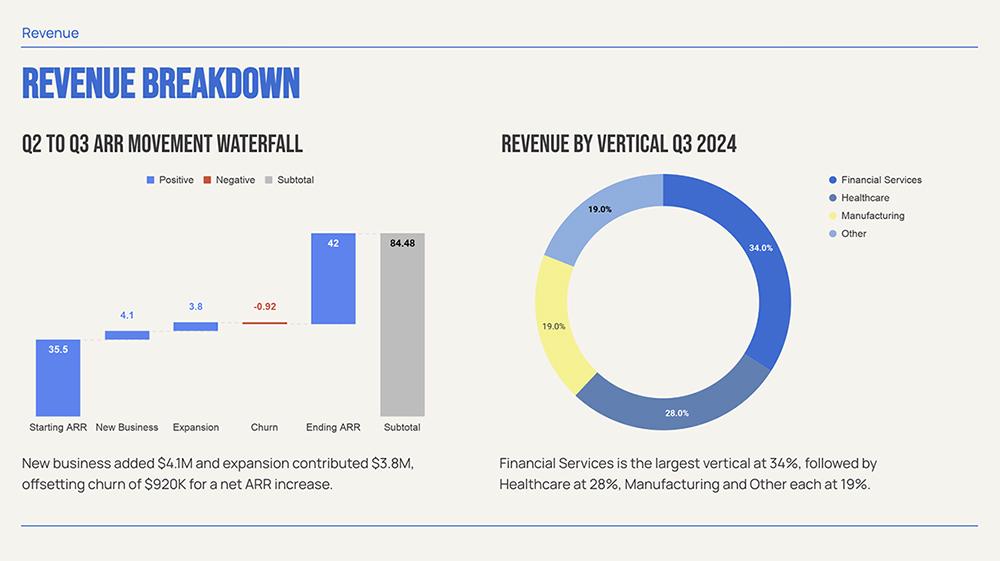
When you use the Google Slides extension, Plus automatically creates a linked spreadsheet in Google Sheets. That means updating visualizations is as easy as adding new data to the spreadsheet as it becomes available.
Will I spend more time fixing AI slides than I saved?
When you use a one-shot slide generator, you’ll often end up wasting a lot of time fixing the slides. But when you use a tool built to edit and iterate, you’ll typically save time — sometimes hours.
The best AI presentation tools have editing capabilities that range from presets to a built-in AI assistant. They allow you to replace individual elements with one click, edit manually to get everything just right, or use natural language commands to make major changes.
Plus AI offers all three options. When you use Plus in Google Slides, you can use the presets to edit with AI and replace images, rewrite copy, or remix layouts with one click. You can also click to move, delete, or edit any element.
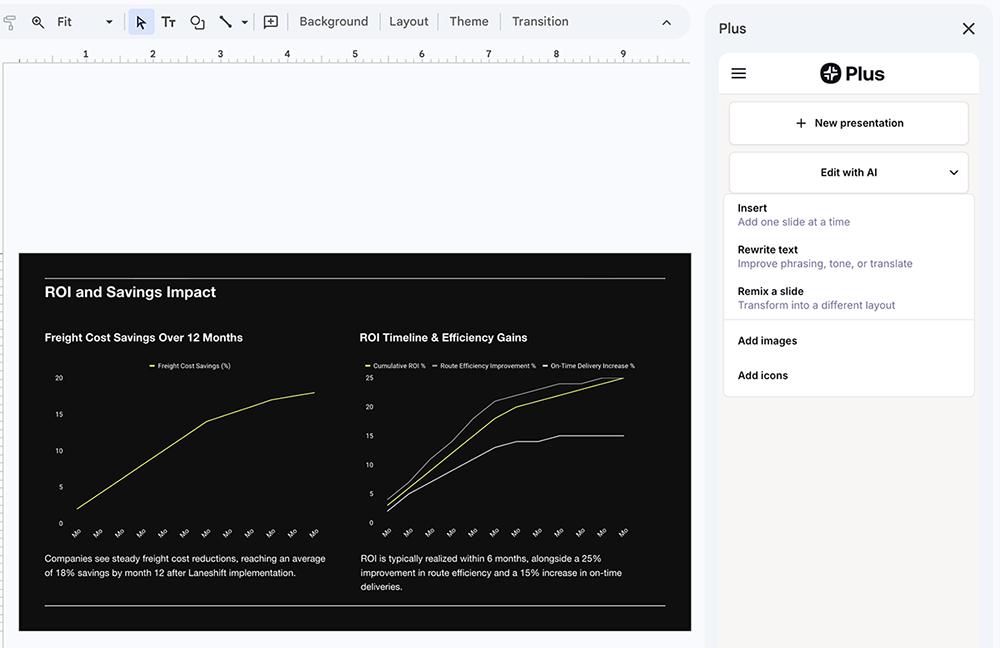
And when you use Plus in PowerPoint, you also get access to the Plus AI Presentation Agent. From the initial prompt to the outline review to the final edit, you can use natural language commands to tell the tool exactly what to do.
The total time you spend will depend on the quality of your initial prompt and the depth of the information you provide. The best AI presentation makers produce a first draft in a few minutes. From there, you review and refine in passes. Even if you end up doing several passes, it’s likely to be faster than spending an afternoon staring at a blank PowerPoint slide, trying to decide where to start.
Can AI slide decks really match my company’s brand?
Some presentation tools can generate on-brand slide decks from a prompt. But when it’s important to get colors, fonts, logos, and layouts exactly right, a prompt isn’t enough.
Instead, you need a slide deck generator that supports custom themes and templates. Most AI presentation platforms let you create a custom theme or layout with colors, fonts, and logos to cut down on editing time.
The best ones take it a step further by allowing you to upload a custom template. This way, you can make sure all your presentations use pre-vetted layouts and formatting.
Plus AI supports both. You can set up a theme or upload a template for your team to use. With Plus, you can also develop a shared preset library that everyone can pull from for more consistent slide decks.
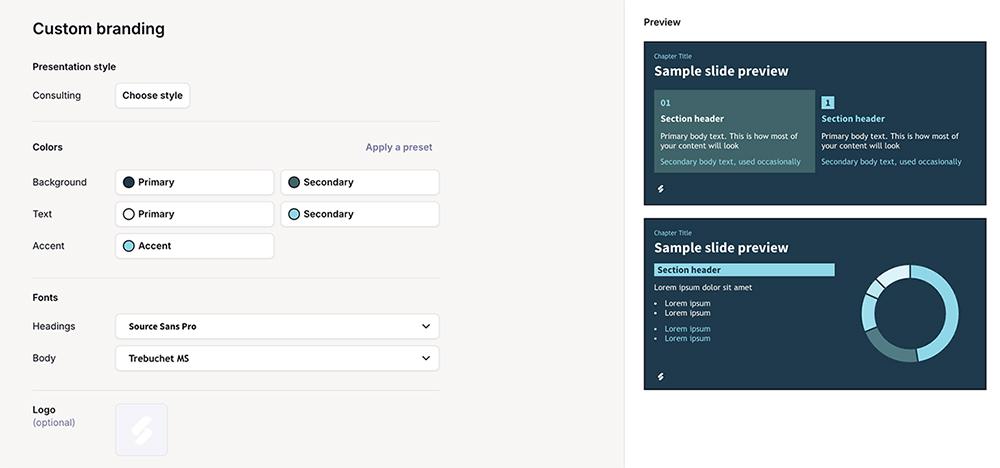
And you can save presets and custom AI instructions so you don’t have to repeat the same information about your company or product every time you build a new deck.
What can’t AI presentation tools do yet?
AI presentation makers can’t decide what your audience needs to hear. You can’t expect them to read your mind and generate a flawless slide deck with a one-line prompt. You have to give them information, context, and data.
Keep in mind that these tools are designed to create presentations that organize the information you give them. While they can use generative AI to expand on ideas and produce relevant copy and images, they need guidance.
You don’t have to be a skilled presentation designer to get good results from them. But you do need a clear picture of the output you expect and be willing to prompt them toward the final version you want.
All slide decks need human review. Like any AI-powered tool, presentation makers can make mistakes. When you test these tools before you buy, you’ll get a better sense of how much time you’ll need to spend on prompting and editing.
How do I know if an AI presentation tool is worth it?
Before investing in a monthly or yearly subscription to an AI presentation tool, I suggest signing up for a free trial. Most tools offer at least a seven-day trial so you can test out different use cases and source material.
In my experience, you rarely need a full week to assess whether an AI presentation maker meets your needs. If you know what you need to test and how to review the results, you can put a tool through its paces in an afternoon or two.
While most tools offer preset prompts, I don’t recommend making your decision around them. Instead of using demo prompts, create your own custom slide deck prompt. Test both text-based prompts and file uploads.
Think about the last deck you created or the next one you need to build. Use that idea to write a prompt that includes instructions for the slides, information about the intended audience, company context, and relevant data.
Go through the tool’s full workflow, starting with the initial prompt and the outline review. Think about:
-
Does the tool support detailed prompts? If it has a character limit, what is it?
-
How well does the template library work for your needs? Does the tool have layouts you’d actually use?
-
How easy is it to edit the outline? Can you add or remove information and reorganize slides?
Next, move onto the first draft. Review:
-
Do the slides look professional? Is information clearly organized? Are takeaways clearly highlighted?
-
Do the slides sound professional? How well does the copy convey what you want to say?
-
How would you rate the image quality? Do the visuals look professional? Do they fit your brand?
Then, give the editing features a thorough test. Consider:
-
Does the tool have one-click editing features that make it easy to rewrite content, change layouts, or swap images?
-
Does the tool have a built-in AI assistant? Can you make major edits like deck redesigns via a single prompt?
-
Can you make minor edits manually? Is it possible to move design elements, or are you locked into a layout?
Finally, see how the presentation and sharing processes work. Look at:
-
Can you share the slide deck or present it to an audience without leaving the tool?
-
What file options are available to export the presentation?
-
If you upload the exported file to Google Slides or PowerPoint, do layout issues arise?
After thoroughly testing the tool, consider the cost. Does it fit into your marketing technology budget? Calculate the number of hours you saved by using the tool versus building the deck manually. Does the saved time justify the cost? If so, the AI presentation tool is likely worth the investment.
The verdict on AI slide decks
So, is AI finally making good presentations? Yes, as long as you choose the right tool. The best AI slide generators now produce clean layouts, on-brand visuals, and copy that sounds professional.
AI solves the blank page problem and saves creative and editing time. But it can’t generate slide decks from nothing. You bring the angle, context, and data to the creative process. And you provide judgment during editing and review.
See how our AI presentation tool saves you time and produces slides that make the whole team look good. Try Plus AI free for seven days and build your next slide deck in minutes.