
Ferramentas de apresentação gratuitas
Converter Word em PPT
Download our free PowerPoint macro toolbar with 200+ macros to make it easier to edit and create new PowerPoint presentations.
Como isso funciona?
- 1
Carregue seu documento do Word
Download the PowerPoint macro toolbar from this link.
- 2
Além disso, a IA gera sua apresentação
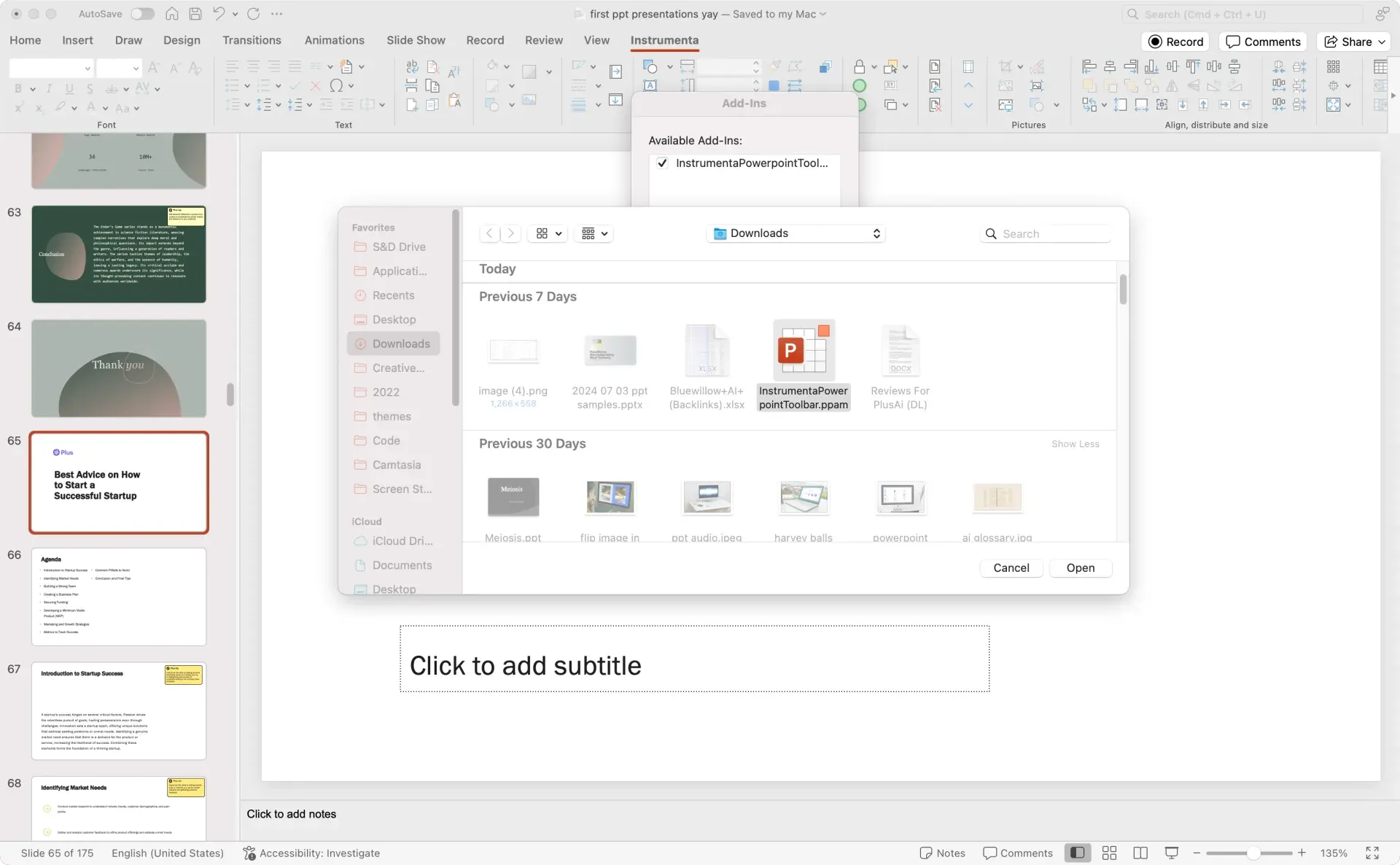
Open PowerPoint, click Tools or Options, click Add-ins, and select the macro file.
- 3
Você recebe um link para os slides
Mouse-over each button to learn more and set your favorites as "alt" keyboard shortcuts.
Recursos do conversor de Word para PPT
-
Apresentações profissionais
Save time by accessing fonts, font size, and formatting in one easy-to-access menu.
-
Extração automatizada de conteúdo
Select text alignment options and add symbols without navigating through multiple menu clicks.
-
Geração de IA com um clique
Format, manipulate, and swap shapes using a set of easy-to-access buttons.
-
Fácil de editar
Add, compress, and crop pictures, set transparent color, and more from one menu.
-
Fácil de compartilhar
Compartilhe seu link do Google Slides com clientes e colegas de trabalho. Ou baixe direto para o PPT
-
Gratuito para usar
Create tables with easy to click buttons to add rows, set gaps, format tables, align text, and more.
-
Export
Collaborate faster with buttons to save selected slides or email selected slides as PDF.
-
Paste and insert
Add content like emojis, Harvey balls, stars, QR codes, or saved slides from a slide library.
-
Advanced
Set custom settings, open toolbars, remove animations, and more.
Perguntas frequentes
Where can I download the BCG macros for PowerPoint?
Several consulting firms, including BCG, have a set of custom PowerPoint macros to help speed up the process of making presentations. While these are typically proprietary to the individual firms, you can install an open source PowerPoint macro tool like Instrumenta instead. Instrumenta offers all of the same functionality as the BCG macros in an open package. Here is the link to download it. You can follow the instructions at the top of the page to install it.
Can you run macros in PowerPoint?
Yes, macros are a great way to quickly manipulate text, objects, and shapes in your PowerPoint presentations. Many advanced PowerPoint users like to have a specialized "macro" toolbar that gives them quick access to these types of commands.
How can I record a macro in PowerPoint?
Enable the Developer Tab, click Record Macro, and then record your actions. You will be able to edit the VBA code afterwards to customize your macro.
Cansado de perder tempo com slides?
Experimente o Plus AI gratuitamente. Comece com um teste gratuito de 7 dias. Cancele quando quiser. Edite e colabore sem complicações, diretamente no Google Slides ou PowerPoint.
Comece gratuitamente